%20scale(0.100000,-0.100000)'%20fill='%23ffffff'%20stroke='none'%3e%3cpath%20d='M2420%202750%20c-163%20-20%20-354%20-77%20-494%20-147%20-145%20-72%20-236%20-142%20-398%20-304%20-134%20-134%20-168%20-163%20-230%20-193%20-87%20-43%20-191%20-61%20-298%20-53%20-41%204%20-145%2017%20-230%2031%20-257%2042%20-408%2058%20-550%2058%20-102%201%20-144%20-3%20-172%20-15%20-31%20-13%20-38%20-21%20-38%20-44%200%20-20%2011%20-40%2038%20-65%2048%20-47%20185%20-133%20331%20-207%20264%20-134%20811%20-361%201326%20-551%20319%20-118%20972%20-335%201320%20-440%20705%20-213%201355%20-371%201704%20-415%20164%20-21%20315%20-17%20354%208%2041%2027%2036%2062%20-16%20112%20-93%2089%20-284%20201%20-639%20374%20-172%2084%20-214%20109%20-272%20162%20-37%2034%20-79%2079%20-92%20100%20-36%2058%20-61%20146%20-69%20244%20-21%20270%20-101%20507%20-246%20727%20-79%20119%20-263%20303%20-379%20379%20-167%20110%20-337%20182%20-521%20219%20-116%2024%20-319%2033%20-429%2020z%20m458%20-204%20c312%20-81%20585%20-273%20747%20-525%2023%20-37%2057%20-94%2074%20-129%2036%20-72%20101%20-260%20100%20-288%200%20-11%20-9%208%20-19%2041%20-64%20213%20-164%20381%20-324%20541%20-101%20102%20-210%20181%20-334%20243%20-101%2051%20-257%2098%20-382%20117%20-191%2028%20-404%207%20-590%20-56%20-78%20-27%20-209%20-91%20-267%20-132%20-24%20-16%20-43%20-27%20-43%20-24%200%2010%20115%2083%20188%20120%2040%2020%20112%2050%20161%2066%20145%2049%20226%2060%20416%2056%20146%20-2%20184%20-7%20273%20-30z%20m-160%20-96%20c165%20-21%20343%20-88%20492%20-185%2090%20-59%20240%20-206%20299%20-294%2063%20-92%20126%20-231%20157%20-346%2027%20-96%2028%20-110%2028%20-340%201%20-275%203%20-281%2086%20-359%2027%20-26%2043%20-46%2035%20-46%20-39%200%20-171%2032%20-184%2044%20-12%2013%20-13%2027%20-4%2083%206%2037%209%2069%208%2071%20-1%201%20-12%20-24%20-24%20-55%20-12%20-32%20-28%20-67%20-36%20-77%20-15%20-19%20-17%20-19%20-127%208%20-163%2040%20-594%20165%20-798%20231%20-391%20127%20-724%20247%20-967%20350%20-111%2046%20-113%2048%20-113%2079%200%2018%207%2055%2015%2081%208%2027%2012%2051%2010%2053%20-2%202%20-15%20-18%20-28%20-45%20-14%20-26%20-34%20-57%20-46%20-67%20-22%20-20%20-22%20-20%20-112%2025%20l-91%2044%2062%207%20c34%204%2081%2017%20106%2028%2051%2025%2087%2068%20170%20200%2066%20106%20176%20228%20274%20302%2036%2027%20110%2072%20165%2099%20200%2098%20412%20135%20623%20109z%20m-1938%20-454%20c227%20-39%20271%20-48%20267%20-52%20-1%20-2%20-79%208%20-173%2022%20-93%2013%20-219%2026%20-281%2027%20-92%202%20-115%20-1%20-129%20-14%20-12%20-13%20-14%20-21%20-5%20-37%2035%20-65%20381%20-239%20871%20-437%20745%20-302%201643%20-594%202429%20-790%20503%20-125%20822%20-176%20914%20-146%2030%2010%2037%2017%2037%2039%200%2018%20-15%2041%20-52%2075%20-55%2054%20-54%2054%2037%20-6%20121%20-80%20154%20-131%20100%20-155%20-36%20-17%20-204%20-15%20-337%204%20-247%2034%20-682%20136%20-1153%20269%20-1111%20315%20-2312%20764%20-2799%201048%20-82%2047%20-156%20112%20-156%20137%200%2020%2016%2035%2045%2043%2040%2012%20244%20-3%20385%20-27z%20m223%20-226%20c13%20-15%208%20-12%20-12%206%20-23%2022%20-31%2036%20-25%2045%207%2011%209%209%2012%20-6%202%20-11%2014%20-31%2025%20-45z%20m3374%20-977%20c35%20-24%2067%20-52%2073%20-63%208%20-15%206%20-22%20-12%20-34%20-12%20-9%20-32%20-16%20-43%20-15%20-19%200%20-19%201%201%209%2012%205%2025%2013%2028%2019%2011%2017%20-52%2078%20-130%20127%20-41%2025%20-74%2048%20-74%2051%200%208%2088%20-45%20157%20-94z'/%3e%3cpath%20d='M1364%201125%20c13%20-169%2052%20-309%20126%20-457%20111%20-221%20307%20-416%20535%20-530%2097%20-49%20203%20-86%20315%20-110%2071%20-15%20132%20-21%20240%20-21%20111%200%20169%205%20248%2022%20245%2052%20435%20152%20598%20317%2034%2034%2076%2083%2094%20109%20l33%2048%20-65%20-55%20c-36%20-30%20-93%20-74%20-126%20-97%20-136%20-92%20-324%20-169%20-481%20-196%20-109%20-19%20-311%20-19%20-431%200%20-125%2021%20-281%2074%20-401%20136%20-195%20102%20-351%20244%20-476%20431%20-76%20114%20-132%20238%20-170%20376%20-15%2053%20-31%20102%20-36%20107%20-6%206%20-7%20-24%20-3%20-80z'/%3e%3c/g%3e%3c/svg%3e) VOID
VOIDVoid APIChat use casesAudit a website with AI and build an actionable SEO plan
Audit a website with AI and build an actionable SEO plan
Expand the research described in post 53 into a repeatable workflow: prepare context, brief the agent, verify evidence and request an implementation plan. The source findings describe the site at the time of that research, not its current version.
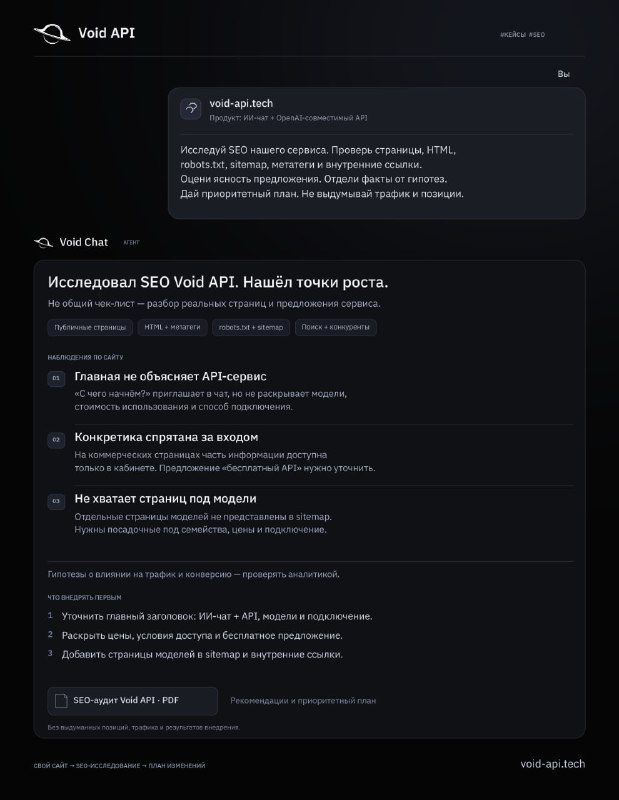
What the agent did and what the post reports
The agent reviewed the home page, model catalog, documentation, connection guides and commercial pages. It inspected robots.txt, sitemap, source HTML, canonical and language markup, structured data and internal links, and looked at search visibility and competitor examples.
The post reports a PDF deliverable. Findings included an unclear API proposition in the main heading, commercial details deferred until sign-in, and individual model pages absent from the sitemap. These are historical source findings, not a fresh audit or measured traffic gains.
1. Prepare the website and product context
Provide the main domain, languages, regions, product description, audience and primary conversion: registration, purchase, API key creation or an inquiry. List important URLs and known access limitations.
The source product combined AI chat and an OpenAI-compatible API, with developers among its audiences. Context lets the agent evaluate whether a visitor understands the offer, price and next step, beyond checking tags.
2. Open Void Chat and brief the agent
Visit Void API, create an account if needed, and open Void Chat. Choose a model with available website research tools and send your context with the prompt below. This workflow does not require a separate OpenCode installation.
Ask for an initial page inventory and clarification questions. If the agent cannot access a URL, supply saved HTML, robots.txt or sitemap and record that limitation. An inaccessible page must not be reported as inspected.
Research the SEO of my service. Check public pages, source HTML, robots.txt, sitemap, metadata and internal links. Assess how clearly the offer is explained and which search intents the site covers. Separate confirmed issues from hypotheses. Provide a prioritized improvement plan with example headings and page structures. Do not invent traffic, rankings or implementation results.3. Inspect public pages and technical signals
Review the home page, product and commercial pages, catalog, documentation and setup guides. Request each URL, response status, title, description, H1, canonical, language alternatives, indexability and internal links. Check robots.txt, sitemap and noindex separately; sitemap inclusion does not prove indexing.
Distinguish response HTML from content rendered after JavaScript. The agent should state which representation it inspected. For structured data, ask for object types and specific errors rather than a simple presence checkbox.
4. Evaluate the proposition and search intent
For each key page, identify its audience, question answered, offer and next action. An API product may need available models, pricing, access conditions, SDK compatibility and a first-request example. Use verified product capabilities.
Map pages to research, comparison, pricing, integration and troubleshooting intents. Competitors illustrate structure, not their traffic or conversion. Do not propose landing pages for unavailable models.
5. Separate findings from hypotheses
Require a URL, text or HTML excerpt, inspection date and explanation for each confirmed finding. Keep claims such as a confusing heading reducing registrations in a separate hypothesis list unless analytics supports them.
Provide dated, filtered Search Console or analytics exports when needed. Search-result observations cannot replace those sources or establish ranking history. Explicitly record missing evidence.
6. Request a prioritized plan and examples
Ask for a table of issue, evidence, affected URLs, change, priority, effort and verification. Address confirmed accessibility and indexability blockers, then clarify the offer, navigation and useful missing pages according to your site.
Request actual heading and structure proposals. The source suggested a clearer chat-plus-API proposition, transparent pricing and conditions, and model pages. Recheck the current site and product before applying these historical recommendations.
7. Produce and review the PDF report
Agree on the content first: summary, scope, sources, confirmed findings, hypotheses, prioritized plan and examples. Then ask the agent to create a PDF using its available tools. The source reports a PDF, but this page does not distribute that original file.
Download and open the output to check fonts, wrapping, tables, links and consistency with the research. If file creation is unavailable, request Markdown or HTML for export. A PDF card in an illustration is not an actual deliverable.
8. Implement and measure separately
Turn the agreed plan into tasks, then recheck changed URLs, source HTML, canonical, language alternatives and sitemap. Record release dates for comparable before-and-after periods.
Use your own analytics for impressions, clicks, indexability and conversions. The original post reports research and recommendations, not demonstrated traffic, ranking or sales improvements. A repeat audit verifies changes without guaranteeing search performance.